
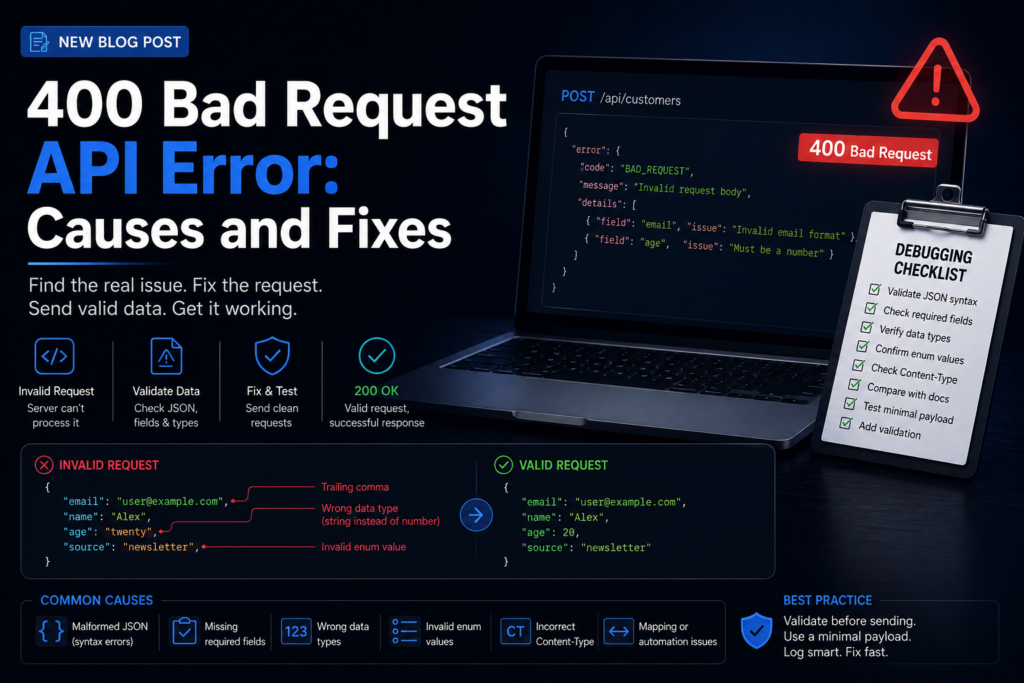
A 400 Bad Request error means the server could not process the request because the request itself is invalid. The issue is usually in the payload, query parameters, headers, content type, or validation rules.
What This Solves
This guide helps you find malformed JSON, missing fields, unsupported values, wrong data types, and broken field mapping in API requests.
Who This Is For
- Developers and technical operators
- SEO, automation, or e-commerce teams
- Site owners who need a repeatable workflow
- Editors or builders documenting technical systems
Short Answer
Compare the request against the API documentation, validate JSON syntax, check required fields, confirm data types, and test the smallest valid payload before adding optional fields.
When This Happens
400 errors happen when the server receives the request but rejects it before normal processing because something in the request is malformed or invalid.
Root Causes
| Symptom | Likely Cause | What to Check |
|---|---|---|
| Invalid JSON message | Malformed payload | Commas, quotes, brackets |
| Required field missing | Incomplete data | Field names and nesting |
| Works manually not in automation | Mapping issue | Empty variables and field paths |
| Only some records fail | Invalid value | Date formats and enums |
Step-by-Step Fix or Implementation
- Read the exact error response body.
- Validate JSON using a parser.
- Remove optional fields and test the smallest valid payload.
- Check required fields, nesting, and data types.
- Confirm Content-Type matches the body format.
- Compare a failing record with a passing record.
- Add validation before sending production requests.
Practical Example
{
"email": "customer@example.com",
"first_name": "Alex",
"source": "newsletter"
}
Start with only required fields. Add optional fields one at a time to identify exactly which field causes the 400 response.
Common Mistakes
- Sending labels instead of API enum values.
- Leaving empty mapped fields in automation tools.
- Using the wrong Content-Type header.
- Assuming a 400 is a server outage.
- Ignoring nested object requirements.
Risks and Limitations
- Retrying an invalid request usually repeats the failure.
- APIs may change validation rules after version updates.
- Debug logs can expose personal data if payloads are copied directly.
Security and Validation Notes
- Do not expose API keys, tokens, or private customer data in screenshots, frontend code, public logs, or repositories.
- Use least-privilege access and human approval for destructive actions.
- Test with safe sample data before connecting production systems.
- Monitor failures after deployment instead of assuming the first successful test is enough.
Testing Checklist
- [ ] JSON validates
- [ ] Required fields present
- [ ] Content-Type correct
- [ ] Enums use API values
- [ ] Passing and failing records compared
- [ ] Input validation added
Recommended Setup
Use a minimal valid payload, validate records before sending, and send invalid records to a review queue instead of retrying the same broken request.
Official Documentation to Check
Related Systems
- How to Fix 401 Unauthorized API Error
- API Error Handling and Retry Logic
- Webhook Not Firing? Debugging Checklist
FAQ
Should I retry a 400 error?
Usually no. Fix the request data first.
Can Content-Type cause a 400?
Yes. If the API expects JSON and receives form data, it may reject the request.
Why does Postman work but my app fails?
Your app may send different headers, encoding, empty variables, or extra fields.
Premium implementation notes
To make this guide production-ready, treat 400 Bad Request API Error: Causes and Fixes as part of a larger request validation system, not as a one-time fix. The practical goal is to create a repeatable process that another team member can follow without guessing. That means the article should define the owner, inputs, expected output, validation step, failure path, and maintenance schedule.
The most important risk to control is bad payloads, malformed JSON, wrong data types, and repeated invalid retries. A basic article might mention this risk once. A premium EskiLab article should show how the risk appears, how to test for it, what to log, and when to stop the workflow for manual review. This is what separates a surface-level tutorial from an operational playbook.
| Control area | Recommended setup | Why it matters |
|---|---|---|
| Owner | developer or data pipeline owner | One person must be responsible for keeping the system accurate after publishing. |
| Primary risk | bad payloads, malformed JSON, wrong data types, and repeated invalid retries | The article should name the risk clearly instead of hiding it behind generic advice. |
| Validation action | validate JSON, required fields, enum values, data types, and Content-Type | The reader should know exactly what to verify before considering the setup complete. |
| Monitoring metric | 400 rate by payload source and field | A premium guide should explain how to detect failure after the first setup. |
| Review cycle | Monthly or after major platform changes | Technical content can become stale when APIs, plugins, or platform rules change. |
Production runbook
Use this runbook whenever the system is created, edited, imported, or moved between staging and production. The runbook is intentionally simple because simple checks are easier to repeat consistently.
- Define the exact use case and the user problem this page or workflow solves.
- Assign the system owner: developer or data pipeline owner.
- Complete the core validation action: validate JSON, required fields, enum values, data types, and Content-Type.
- Record the expected output and the conditions that should block publishing, retrying, indexing, or automation.
- Run at least one successful test and one controlled failure test before relying on the setup.
- Monitor the main health metric: 400 rate by payload source and field.
- Schedule a review after major platform updates, plugin changes, API changes, site migrations, or bulk imports.
Validation scenarios
A premium technical guide should not only describe the final state; it should explain how to prove the system works. Use these validation scenarios before publishing the article or deploying the workflow described in it.
- Test the happy path where the request validation system works with clean input and expected settings.
- Test the failure path where the most common risk appears: bad payloads, malformed JSON, wrong data types, and repeated invalid retries.
- Test a missing-data case so the workflow does not create an incomplete record or vague recommendation.
- Test a permission or access issue and confirm the system fails safely instead of exposing secrets or private data.
- Test the recovery path: what happens after the fix, retry, rollback, or manual review step?
Monitoring KPIs
After the first setup, the system should be monitored. Otherwise the same problem can return quietly after a deployment, plugin update, API change, content import, or data cleanup. Track a small number of useful signals instead of creating a dashboard nobody checks.
- Primary health metric: 400 rate by payload source and field.
- Number of repeated failures or repeated manual fixes required.
- Number of pages, requests, workflows, or records affected by the issue.
- Time between problem detection and resolution.
- Whether the documented runbook was enough for another person to repeat the fix.
Editorial quality review
Before importing or scheduling this post, review it like a technical document. The page should help the reader build, fix, test, compare, automate, or monitor something. If it only defines a concept, it is not strong enough for EskiLab.
- The page has one clear search intent and does not try to cover unrelated problems.
- The article gives an answer early, then explains the system in enough depth for implementation.
- The content includes a table, checklist, example setup, risks, monitoring notes, and official documentation links.
- Claims are realistic. The page does not promise guaranteed rankings, revenue, security, or zero-error automation.
- Any AI-assisted or technical recommendation is framed as a workflow to validate, not as a magic shortcut.
Official documentation to check
Platform behavior can change. Before relying on this guide for a production workflow, verify current details with the relevant official documentation or primary reference below.

Premium FAQ additions
What makes this a premium EskiLab article?
It gives the reader a working system: diagnosis, implementation, validation, failure handling, monitoring, and maintenance. It does not stop at a definition or generic advice.
When should this guide be updated?
Update it after major API changes, plugin updates, Google Search documentation changes, AI model/tooling changes, Shopify changes, automation platform changes, or whenever a real failure reveals a missing step.
Should this workflow be automated fully?
Only low-risk repeatable steps should be automated without review. Any action that can publish, delete, charge, email, expose private data, or change customer records should include logging and human approval unless the team has a tested control system.