
Internal Linking System for WordPress Sites

Caglar A.

May 17, 2026

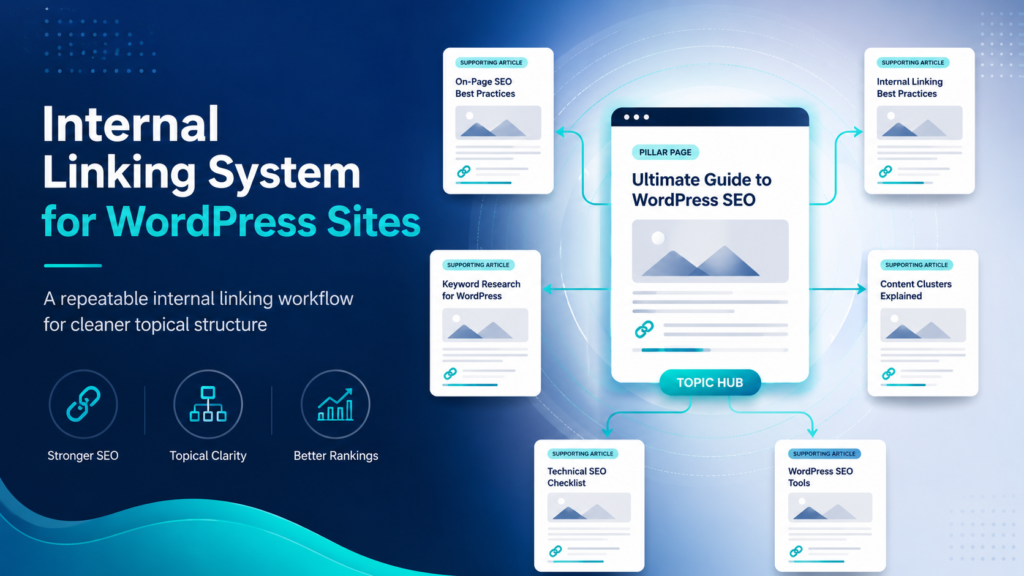
Internal linking is not random links between posts. A strong WordPress internal linking system helps users move through related topics and helps search engines understand which pages are central to each topic cluster.

What This Solves

This guide helps you design a repeatable internal linking workflow with category hubs, supporting posts, anchor text rules, and update checkpoints.

Who This Is For

  • Developers and technical operators
  • SEO, automation, or e-commerce teams
  • Site owners who need a repeatable workflow
  • Editors or builders documenting technical systems

Short Answer

Create one hub per core topic, map supporting articles to that hub, link supporting articles back to the hub, connect related supporting pages, and review links during every content update.

When This Happens

Internal linking problems happen when posts are published one by one without a topic map, causing orphan pages, weak hubs, repeated anchor text, and messy archives.

Root Causes

Symptom Likely Cause What to Check
Important page has few links No hub structure Internal link count
Posts have no links Publishing workflow gap Orphan pages
Links use vague anchors Weak context Anchor text
Old posts ignore new posts No refresh workflow Update process

Step-by-Step Fix or Implementation

  1. List main topic hubs.
  2. Assign every article to one primary hub.
  3. Link each supporting article to its hub.
  4. Add 2 to 4 related links between supporting articles.
  5. Use descriptive anchor text.
  6. Update older articles when publishing a new important guide.
  7. Track orphan pages monthly.
  8. Remove irrelevant links.

Practical Example

Page Type Purpose Links To
Hub page Routes users Best guides and checklists
Supporting guide Solves one problem Parent hub and related guides
Checklist Helps apply system Guide and hub
Comparison Decision support Relevant system guide

Common Mistakes

  • Using only exact-match anchors.
  • Linking every post to every other post.
  • Ignoring orphan pages.
  • Letting tag archives compete with hubs.
  • Adding links that do not help the user.

Risks and Limitations

  • Internal linking cannot fix low-quality content alone.
  • Too many irrelevant links hurt usability.
  • Automated linking still needs review.

Security and Validation Notes

  • Do not expose API keys, tokens, or private customer data in screenshots, frontend code, public logs, or repositories.
  • Use least-privilege access and human approval for destructive actions.
  • Test with safe sample data before connecting production systems.
  • Monitor failures after deployment instead of assuming the first successful test is enough.

Testing Checklist

  • [ ] Every article has a primary hub
  • [ ] No important orphan pages
  • [ ] Anchor text descriptive
  • [ ] Old posts updated
  • [ ] Hub pages maintained
  • [ ] Irrelevant links removed

Recommended Setup

Use a hub-and-spoke structure: one strong hub per core topic, supporting posts for specific problems, and a monthly internal link review.

Official Documentation to Check

Related Systems

  • SEO QA Checklist Before Publishing a New Page
  • Rank Math Category SEO Setup
  • Programmatic SEO Without Thin Content

FAQ

How many internal links should a post have?

There is no fixed number. Use enough to help the reader naturally.

Should I automate links?

Automation can find opportunities, but placement should be reviewed.

Can links improve SEO?

They can help structure and discovery when the content is useful.

Premium implementation notes

To make this guide production-ready, treat Internal Linking System for WordPress Sites as part of a larger topical hub and internal linking system, not as a one-time fix. The practical goal is to create a repeatable process that another team member can follow without guessing. That means the article should define the owner, inputs, expected output, validation step, failure path, and maintenance schedule.

The most important risk to control is orphan pages, weak hubs, cannibalization, and over-optimized anchors. A basic article might mention this risk once. A premium EskiLab article should show how the risk appears, how to test for it, what to log, and when to stop the workflow for manual review. This is what separates a surface-level tutorial from an operational playbook.

Control area Recommended setup Why it matters
Owner SEO editor One person must be responsible for keeping the system accurate after publishing.
Primary risk orphan pages, weak hubs, cannibalization, and over-optimized anchors The article should name the risk clearly instead of hiding it behind generic advice.
Validation action map hubs, assign supporting pages, use descriptive anchors, and refresh links monthly The reader should know exactly what to verify before considering the setup complete.
Monitoring metric orphan page count and internal links to priority pages A premium guide should explain how to detect failure after the first setup.
Review cycle Monthly or after major platform changes Technical content can become stale when APIs, plugins, or platform rules change.

Production runbook

Use this runbook whenever the system is created, edited, imported, or moved between staging and production. The runbook is intentionally simple because simple checks are easier to repeat consistently.

  1. Define the exact use case and the user problem this page or workflow solves.
  2. Assign the system owner: SEO editor.
  3. Complete the core validation action: map hubs, assign supporting pages, use descriptive anchors, and refresh links monthly.
  4. Record the expected output and the conditions that should block publishing, retrying, indexing, or automation.
  5. Run at least one successful test and one controlled failure test before relying on the setup.
  6. Monitor the main health metric: orphan page count and internal links to priority pages.
  7. Schedule a review after major platform updates, plugin changes, API changes, site migrations, or bulk imports.

Validation scenarios

A premium technical guide should not only describe the final state; it should explain how to prove the system works. Use these validation scenarios before publishing the article or deploying the workflow described in it.

  • Test the happy path where the topical hub and internal linking system works with clean input and expected settings.
  • Test the failure path where the most common risk appears: orphan pages, weak hubs, cannibalization, and over-optimized anchors.
  • Test a missing-data case so the workflow does not create an incomplete record or vague recommendation.
  • Test a permission or access issue and confirm the system fails safely instead of exposing secrets or private data.
  • Test the recovery path: what happens after the fix, retry, rollback, or manual review step?

Monitoring KPIs

After the first setup, the system should be monitored. Otherwise the same problem can return quietly after a deployment, plugin update, API change, content import, or data cleanup. Track a small number of useful signals instead of creating a dashboard nobody checks.

  • Primary health metric: orphan page count and internal links to priority pages.
  • Number of repeated failures or repeated manual fixes required.
  • Number of pages, requests, workflows, or records affected by the issue.
  • Time between problem detection and resolution.
  • Whether the documented runbook was enough for another person to repeat the fix.

Editorial quality review

Before importing or scheduling this post, review it like a technical document. The page should help the reader build, fix, test, compare, automate, or monitor something. If it only defines a concept, it is not strong enough for EskiLab.

  • The page has one clear search intent and does not try to cover unrelated problems.
  • The article gives an answer early, then explains the system in enough depth for implementation.
  • The content includes a table, checklist, example setup, risks, monitoring notes, and official documentation links.
  • Claims are realistic. The page does not promise guaranteed rankings, revenue, security, or zero-error automation.
  • Any AI-assisted or technical recommendation is framed as a workflow to validate, not as a magic shortcut.

Official documentation to check

Platform behavior can change. Before relying on this guide for a production workflow, verify current details with the relevant official documentation or primary reference below.


Premium FAQ additions

What makes this a premium EskiLab article?

It gives the reader a working system: diagnosis, implementation, validation, failure handling, monitoring, and maintenance. It does not stop at a definition or generic advice.

When should this guide be updated?

Update it after major API changes, plugin updates, Google Search documentation changes, AI model/tooling changes, Shopify changes, automation platform changes, or whenever a real failure reveals a missing step.

Should this workflow be automated fully?

Only low-risk repeatable steps should be automated without review. Any action that can publish, delete, charge, email, expose private data, or change customer records should include logging and human approval unless the team has a tested control system.

Leave a Comment