
AI Automation Safety Checklist

Caglar A.

May 23, 2026

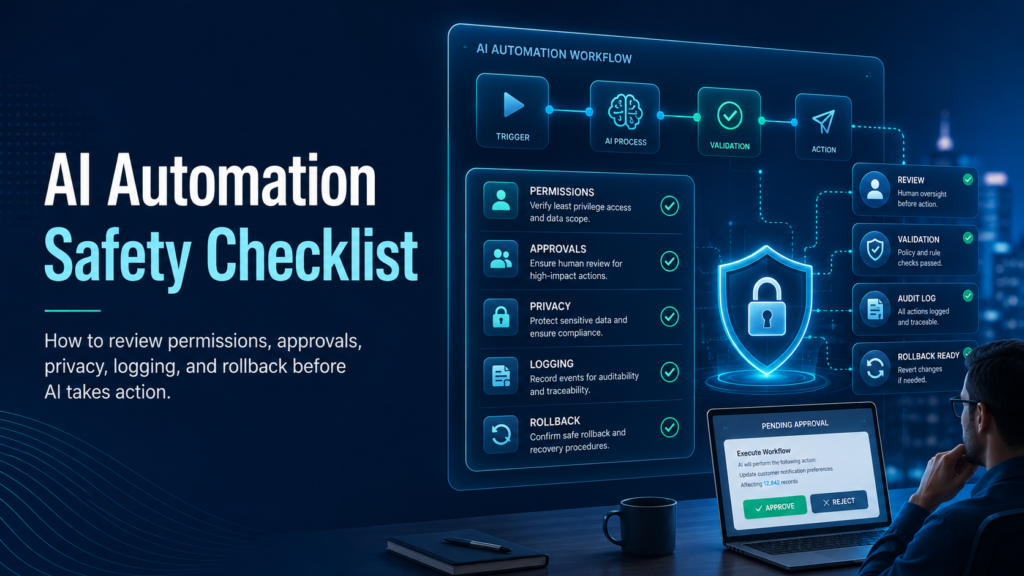
AI automation safety checklist showing permissions, approvals, privacy, logging, rollback, and human review controls before automated actions run.

AI automation becomes risky when it moves from drafting to doing. Workflows that publish, email, delete, charge, or change records need safety checks before running automatically.

What This Solves

This checklist helps review AI automation workflows for permissions, human approval, logging, privacy, rollback, and failure handling.

Who This Is For

  • Developers and technical operators
  • SEO, automation, or e-commerce teams
  • Site owners who need a repeatable workflow
  • Editors or builders documenting technical systems

Short Answer

Define allowed actions, limit permissions, add human approval for high-impact steps, validate outputs, log decisions, protect private data, and create a rollback plan.

When This Happens

Safety checks are needed when AI output triggers real actions instead of staying as a draft or recommendation.

Root Causes

Symptom Likely Cause What to Check
Wrong message sent No approval step Human review
Wrong record changed Weak matching Record ID validation
Data deleted Too much permission Least privilege
Private data leaked No privacy review Inputs, outputs, logs

Step-by-Step Fix or Implementation

  1. Map trigger, input, AI step, and action.
  2. Classify actions by risk level.
  3. Use least-privilege permissions.
  4. Add human approval before external or destructive actions.
  5. Validate AI outputs against rules.
  6. Log workflow runs safely.
  7. Set retry limits and failure alerts.
  8. Create rollback steps.
  9. Test with safe sample data.

Practical Example

Action Risk Required Control
Draft internal notes Low Review before use
Publish content Medium Approval and SEO QA
Email customers High Approval and preview
Delete records High Manual approval and backup
Payments Very high Compliance review

Common Mistakes

  • Giving AI admin access.
  • Skipping preview steps.
  • Sending customer emails automatically.
  • No rollback plan.
  • Testing only perfect inputs.
  • Logging sensitive data.

Risks and Limitations

  • AI can be wrong even when the workflow runs successfully.
  • Automation can scale mistakes quickly.
  • Privacy rules may apply depending on data and region.

Security and Validation Notes

  • Do not expose API keys, tokens, or private customer data in screenshots, frontend code, public logs, or repositories.
  • Use least-privilege access and human approval for destructive actions.
  • Test with safe sample data before connecting production systems.
  • Monitor failures after deployment instead of assuming the first successful test is enough.

Testing Checklist

  • [ ] Actions documented
  • [ ] Permissions limited
  • [ ] High-risk actions require approval
  • [ ] Outputs validated
  • [ ] Sample data tested
  • [ ] Logs enabled
  • [ ] Retry limits exist
  • [ ] Rollback documented

Recommended Setup

Start with low-risk drafting tasks, then add approvals, validation, logging, and monitoring before connecting AI to external or destructive actions.

Related Systems

  • AI Agent Evaluation Framework
  • n8n Workflow Error Handling
  • RAG Pipeline Architecture for Beginners

FAQ

Should AI publish automatically?

For most sites, use AI to draft and human review to publish.

What needs approval?

Publishing, deleting, emailing, payments, and customer record changes.

Can AI replace QA?

No. It can assist QA but does not replace tests and oversight.

Premium implementation notes

To make this guide production-ready, treat AI Automation Safety Checklist as part of a larger AI workflow safety and governance system, not as a one-time fix. The practical goal is to create a repeatable process that another team member can follow without guessing. That means the article should define the owner, inputs, expected output, validation step, failure path, and maintenance schedule.

The most important risk to control is publishing, emailing, deleting, or updating customer data without review. A basic article might mention this risk once. A premium EskiLab article should show how the risk appears, how to test for it, what to log, and when to stop the workflow for manual review. This is what separates a surface-level tutorial from an operational playbook.

Control area Recommended setup Why it matters
Owner automation owner One person must be responsible for keeping the system accurate after publishing.
Primary risk publishing, emailing, deleting, or updating customer data without review The article should name the risk clearly instead of hiding it behind generic advice.
Validation action classify action risk, minimize data, validate outputs, add approval gates, and log all actions The reader should know exactly what to verify before considering the setup complete.
Monitoring metric manual approval rate, incident count, and override rate A premium guide should explain how to detect failure after the first setup.
Review cycle Monthly or after major platform changes Technical content can become stale when APIs, plugins, or platform rules change.

Production runbook

Use this runbook whenever the system is created, edited, imported, or moved between staging and production. The runbook is intentionally simple because simple checks are easier to repeat consistently.

  1. Define the exact use case and the user problem this page or workflow solves.
  2. Assign the system owner: automation owner.
  3. Complete the core validation action: classify action risk, minimize data, validate outputs, add approval gates, and log all actions.
  4. Record the expected output and the conditions that should block publishing, retrying, indexing, or automation.
  5. Run at least one successful test and one controlled failure test before relying on the setup.
  6. Monitor the main health metric: manual approval rate, incident count, and override rate.
  7. Schedule a review after major platform updates, plugin changes, API changes, site migrations, or bulk imports.

Validation scenarios

A premium technical guide should not only describe the final state; it should explain how to prove the system works. Use these validation scenarios before publishing the article or deploying the workflow described in it.

  • Test the happy path where the AI workflow safety and governance system works with clean input and expected settings.
  • Test the failure path where the most common risk appears: publishing, emailing, deleting, or updating customer data without review.
  • Test a missing-data case so the workflow does not create an incomplete record or vague recommendation.
  • Test a permission or access issue and confirm the system fails safely instead of exposing secrets or private data.
  • Test the recovery path: what happens after the fix, retry, rollback, or manual review step?

Monitoring KPIs

After the first setup, the system should be monitored. Otherwise the same problem can return quietly after a deployment, plugin update, API change, content import, or data cleanup. Track a small number of useful signals instead of creating a dashboard nobody checks.

  • Primary health metric: manual approval rate, incident count, and override rate.
  • Number of repeated failures or repeated manual fixes required.
  • Number of pages, requests, workflows, or records affected by the issue.
  • Time between problem detection and resolution.
  • Whether the documented runbook was enough for another person to repeat the fix.

Editorial quality review

Before importing or scheduling this post, review it like a technical document. The page should help the reader build, fix, test, compare, automate, or monitor something. If it only defines a concept, it is not strong enough for EskiLab.

  • The page has one clear search intent and does not try to cover unrelated problems.
  • The article gives an answer early, then explains the system in enough depth for implementation.
  • The content includes a table, checklist, example setup, risks, monitoring notes, and official documentation links.
  • Claims are realistic. The page does not promise guaranteed rankings, revenue, security, or zero-error automation.
  • Any AI-assisted or technical recommendation is framed as a workflow to validate, not as a magic shortcut.

Official documentation to check

Platform behavior can change. Before relying on this guide for a production workflow, verify current details with the relevant official documentation or primary reference below.


Premium FAQ additions

What makes this a premium EskiLab article?

It gives the reader a working system: diagnosis, implementation, validation, failure handling, monitoring, and maintenance. It does not stop at a definition or generic advice.

When should this guide be updated?

Update it after major API changes, plugin updates, Google Search documentation changes, AI model/tooling changes, Shopify changes, automation platform changes, or whenever a real failure reveals a missing step.

Should this workflow be automated fully?

Only low-risk repeatable steps should be automated without review. Any action that can publish, delete, charge, email, expose private data, or change customer records should include logging and human approval unless the team has a tested control system.

Leave a Comment