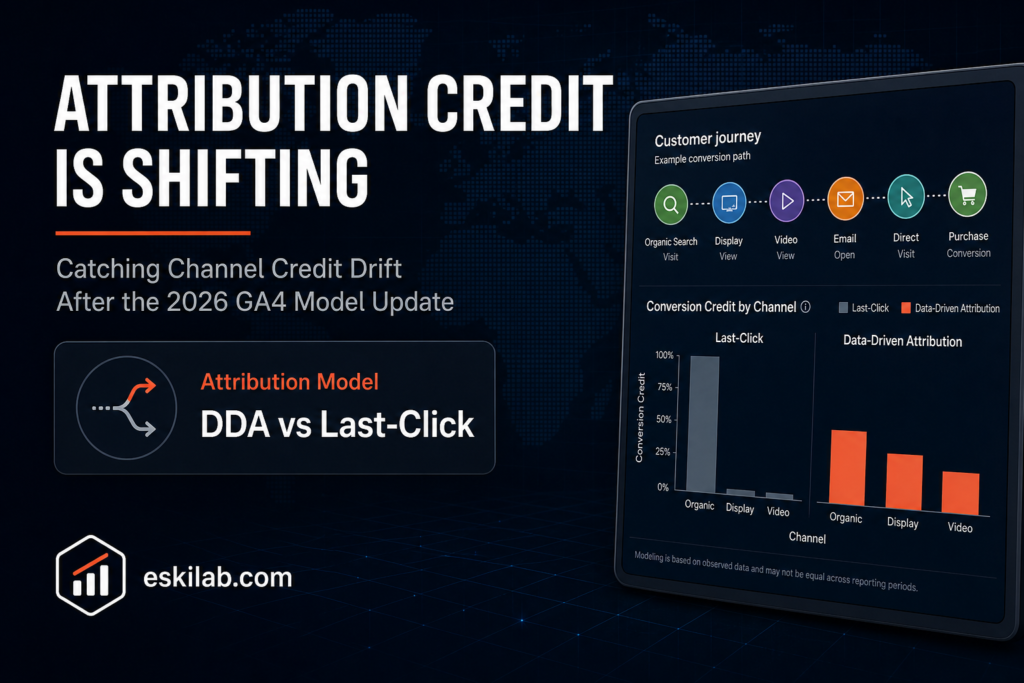
Since GA4’s data-driven attribution rollout, branded keyword traffic that used to credit direct or organic sometimes credits Display or Video instead, if the user had an earlier touchpoint from one of those channels in their path. The total organic session count doesn’t change — the credit for the conversion inside the attribution report does. If a stakeholder pulls up a channel performance report and sees organic conversions down and Display conversions up with no change in actual traffic, that’s very likely this shift, not a real performance change, and reporting it as either without checking is how false alarms start.
Why This Happens Under Data-Driven Attribution
Data-driven attribution (DDA) assigns conversion credit based on a machine-learning model’s estimate of each touchpoint’s actual contribution across the full path, rather than a fixed rule like last-click. Under last-click, a branded search right before conversion got full credit regardless of what came before it. Under DDA, if a user saw a Display ad three days earlier and then searched the brand name before converting, the model may now assign partial or majority credit to that earlier Display touch — a defensible model decision, but a visible change in reported channel performance if you’re comparing against historical last-click-era numbers without accounting for the model change itself.
Auditing a Reported Shift Before Reacting to It
| Check | What It Tells You |
|---|---|
| Total organic sessions/users, not just attributed conversions | If raw traffic is flat but attributed conversions dropped, this is a credit-allocation shift, not a traffic or performance problem |
| The model-comparison drawer in Conversions reports | Directly shows how the same underlying data would be credited under last-click versus DDA — the fastest way to confirm this is a model artifact |
| The Conversion Attribution Analysis Report (beta) | Shows full-path value across the customer journey, which surfaces the upstream Display or Video touch that’s now getting credit |
| Timing of the reported shift against your DDA rollout or model recalculation date | A shift that starts exactly when the model changed is a strong signal it’s the model, not the market |
A Practical Audit Workflow
- Pull raw channel traffic (sessions, users) for the period in question, independent of any attribution model, as your ground truth for whether real behavior changed.
- Open the model-comparison drawer for the same period and compare DDA-credited conversions against last-click-credited conversions for the affected channels.
- If the gap between models is large and traffic is flat, you have your answer: report the change as an attribution model artifact, not a channel performance change, and explain the earlier-touchpoint mechanism directly rather than letting the raw report speak for itself.
- If raw traffic also moved, don’t stop at the model explanation — there may be a genuine performance change underneath the attribution shift, and conflating the two is as much a reporting error as missing the attribution shift in the first place.
- Document the baseline once per major GA4 attribution change, so the next model update doesn’t require rebuilding this audit from scratch under time pressure.
What to Tell Stakeholders
The honest version is specific, not reassuring in the abstract: “Organic traffic is flat. The reason organic conversions look lower in this report is that GA4’s attribution model now gives partial credit to an earlier Display touchpoint in the same conversion path — total conversions across all channels combined haven’t changed.” That’s a defensible, checkable claim. “The numbers just moved, don’t worry about it” is not, and it erodes trust in the reporting the next time something actually does change.