AI automation becomes risky when it moves from drafting to doing. Workflows that publish, email, delete, charge, or change records need safety checks before running automatically.
What This Solves
This checklist helps review AI automation workflows for permissions, human approval, logging, privacy, rollback, and failure handling.
Who This Is For
- Developers and technical operators
- SEO, automation, or e-commerce teams
- Site owners who need a repeatable workflow
- Editors or builders documenting technical systems
Short Answer
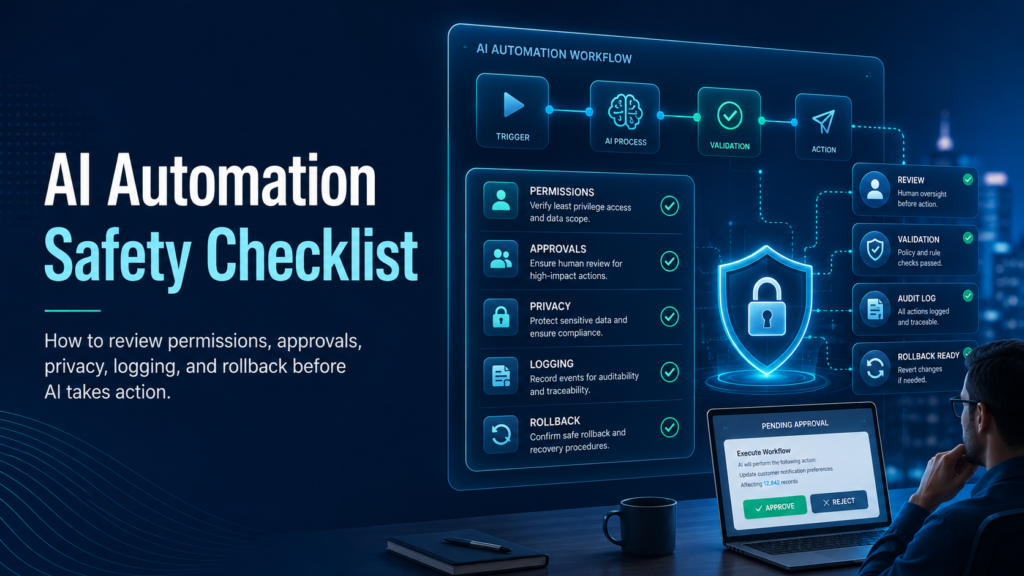
Define allowed actions, limit permissions, add human approval for high-impact steps, validate outputs, log decisions, protect private data, and create a rollback plan.
When This Happens
Safety checks are needed when AI output triggers real actions instead of staying as a draft or recommendation.
Root Causes
| Symptom | Likely Cause | What to Check |
|---|---|---|
| Wrong message sent | No approval step | Human review |
| Wrong record changed | Weak matching | Record ID validation |
| Data deleted | Too much permission | Least privilege |
| Private data leaked | No privacy review | Inputs, outputs, logs |
Step-by-Step Fix or Implementation
- Map trigger, input, AI step, and action.
- Classify actions by risk level.
- Use least-privilege permissions.
- Add human approval before external or destructive actions.
- Validate AI outputs against rules.
- Log workflow runs safely.
- Set retry limits and failure alerts.
- Create rollback steps.
- Test with safe sample data.
Practical Example
| Action | Risk | Required Control |
|---|---|---|
| Draft internal notes | Low | Review before use |
| Publish content | Medium | Approval and SEO QA |
| Email customers | High | Approval and preview |
| Delete records | High | Manual approval and backup |
| Payments | Very high | Compliance review |
Common Mistakes
- Giving AI admin access.
- Skipping preview steps.
- Sending customer emails automatically.
- No rollback plan.
- Testing only perfect inputs.
- Logging sensitive data.
Risks and Limitations
- AI can be wrong even when the workflow runs successfully.
- Automation can scale mistakes quickly.
- Privacy rules may apply depending on data and region.
Security and Validation Notes
- Do not expose API keys, tokens, or private customer data in screenshots, frontend code, public logs, or repositories.
- Use least-privilege access and human approval for destructive actions.
- Test with safe sample data before connecting production systems.
- Monitor failures after deployment instead of assuming the first successful test is enough.
Testing Checklist
- [ ] Actions documented
- [ ] Permissions limited
- [ ] High-risk actions require approval
- [ ] Outputs validated
- [ ] Sample data tested
- [ ] Logs enabled
- [ ] Retry limits exist
- [ ] Rollback documented
Recommended Setup
Start with low-risk drafting tasks, then add approvals, validation, logging, and monitoring before connecting AI to external or destructive actions.
Related Systems
- AI Agent Evaluation Framework
- n8n Workflow Error Handling
- RAG Pipeline Architecture for Beginners
FAQ
Should AI publish automatically?
For most sites, use AI to draft and human review to publish.
What needs approval?
Publishing, deleting, emailing, payments, and customer record changes.
Can AI replace QA?
No. It can assist QA but does not replace tests and oversight.
Official documentation to check
Platform behavior can change. Before relying on this guide for a production workflow, verify current details with the relevant official documentation or primary reference below.