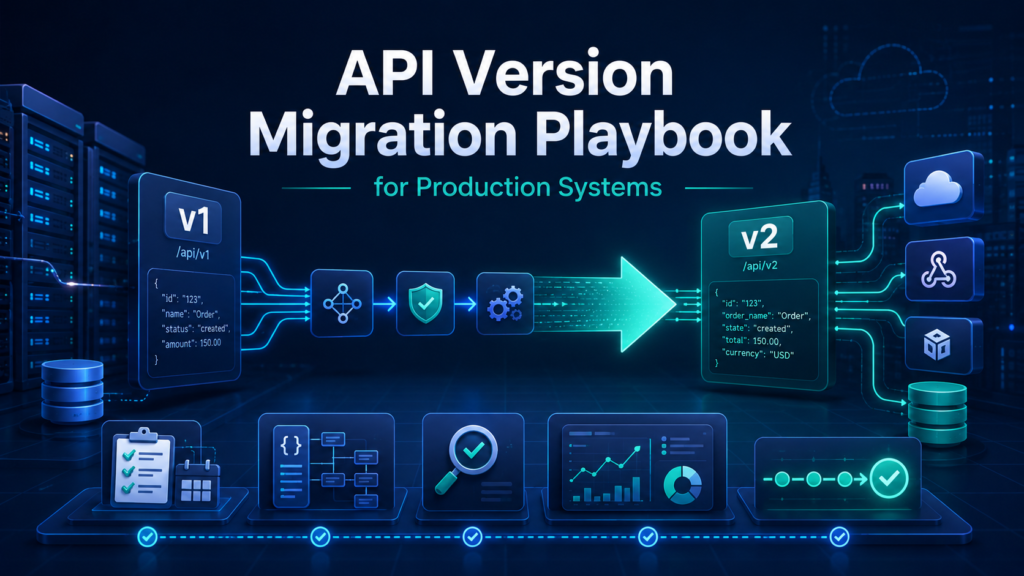
API Version Migration Playbook for Production Systems
Last reviewed: 2026-05-10. This is a deep EskiLab implementation guide for API version migration. It is written for teams that need operational reliability, not a surface-level definition.
A version migration is a system contract change, not a dependency update. Treat it like a controlled release.
What this guide is designed to do
This guide helps teams move production integrations to a new API version without breaking data mappings, webhooks, scheduled jobs, or downstream reports. It focuses on the operating decisions behind the system: ownership, data contracts, failure modes, QA scenarios, monitoring, and the point where automation should stop and review should begin.
Who should use this
Developers, technical seos, shopify teams, saas teams, agencies, and operators responsible for integrations that cannot break silently should use this as a production planning and QA reference. It is especially relevant when the workflow affects customers, analytics, public pages, revenue, product data, or long-running automation.
Executive summary
A reliable API version migration system defines the operating contract, validates inputs before action, tests failure modes, monitors drift after launch, and documents ownership so the workflow can be maintained without guesswork.
Inventory before code changes
The first job is not editing code. The first job is knowing where the old version is used. Search application code, serverless functions, automation platforms, scheduled jobs, webhook handlers, dashboards, product feeds, and documentation. API usage often hides outside the main codebase.
Build an endpoint inventory with method, path, version, owner, schedule, downstream system, critical fields, and business impact. Without this inventory, a migration test only proves that the obvious endpoint still works.
Contract testing mindset
An API response can return HTTP 200 and still break your business logic. The fields may exist but change type, meaning, nesting, pagination behavior, rate limit behavior, default sort, error format, or webhook payload shape. Contract tests should check the fields and behaviors your workflow depends on.
Do not test only the happy path. Include empty results, missing optional fields, large responses, invalid credentials, rate limits, pagination endings, and webhook retries.
Staged rollout and rollback
Roll out the new version first in a non-production environment, then a low-risk job, then a small production slice, then full traffic. Keep the old version available until critical workflows have passed monitoring windows.
Rollback planning must consider writes. If the new version writes data differently, rollback may not fully undo the business effect. For high-impact changes, add a pause point before production writes during the first rollout window.
Migration inventory fields
| Field | Why it matters | Example |
|---|---|---|
| Endpoint | Shows what must be tested | GET /products |
| Critical fields | Defines contract tests | id, handle, variants, updated_at |
| Downstream system | Shows business impact | product catalog, CRM, report |
| Owner | Assigns responsibility | e-commerce ops |
| Rollback option | Defines safety | switch API version header back |
Payload comparison checks
| Check | Old version | New version |
|---|---|---|
| Required fields | Present and type stable | Present and type stable |
| Pagination | Same stop condition | New token or cursor rules documented |
| Errors | Expected status and body | Mapped to existing handler |
| Rate limits | Known headers | New limits reviewed |
| Webhooks | Old event shape | New event shape tested |
Implementation workflow
- Create a complete endpoint and workflow inventory.
- Read provider release notes and deprecation timelines.
- List breaking changes and map them to affected workflows.
- Build contract tests for required response fields and error behaviors.
- Compare old and new payloads using real samples.
- Update mapping, validation, monitoring, and documentation together.
- Run a staged rollout with a rollback window.
- Monitor error rates, data counts, and business outputs after each stage.
Common mistakes that make this system shallow
- Updating the SDK and assuming the migration is complete.
- Testing only one endpoint while scheduled jobs still use the old version.
- Ignoring webhook payload changes.
- Not checking field meaning changes.
- Forgetting dashboards and reports that depend on old fields.
- Skipping rollback planning for write operations.
Pre-production QA checklist
- [ ] Endpoint inventory is complete.
- [ ] Breaking changes are mapped to workflows.
- [ ] Contract tests cover required fields.
- [ ] Old and new payloads are compared.
- [ ] Webhook payloads are tested.
- [ ] Rollback path is documented.
Monitoring signals after launch
Do not judge the system only by whether the first test worked. Use ongoing monitoring to detect drift, silent failure, and operational risk.
- error rate by endpoint
- payload validation failures
- record count differences
- webhook failure rate
- business output mismatches
Incident review questions
- What exact input, event, URL, record, prompt, or action triggered the failure?
- Was the failure caused by source data, mapping, permissions, timing, platform behavior, or missing validation?
- Did the system fail safely, or did it create a downstream side effect?
- Was the issue visible in logs or only discovered by a user?
- What rule, test case, monitor, or approval step should be added so this failure is easier to catch next time?
Official documentation to check
Recommended operating standard
For API version migration, the minimum operating standard is: define the contract, test the failure modes, monitor the output, document the owner, and keep a rollback or review path. Anything less may work in a demo but will be fragile in production.
FAQ
Why is API version migration not just a one-time setup?
Because the surrounding systems change: APIs, tools, data, user behavior, plugins, prompts, feeds, and business rules. A one-time setup without monitoring becomes stale.
What is the first thing to test?
Test the failure mode that would create the most business damage: duplicate writes, wrong public pages, bad tracking, invalid feed data, unsafe AI action, or broken indexation.
Should this be automated completely?
Only low-risk, reversible steps should be fully automated. Anything that changes customer data, sends messages, publishes pages, affects payments, or modifies important SEO signals should have review, logging, or staged rollout.
How do I know the article's system is deep enough to publish?
It should include a real operating model: data fields or rules, failure modes, QA scenarios, monitoring signals, mistakes, and official documentation references.