Indexation Control System for Large WordPress Sites
Last reviewed: 2026-05-10. This is a deep EskiLab implementation guide for WordPress indexation control. It is written for teams that need operational reliability, not a surface-level definition.
Indexation control is quality control at URL scale. A site can have good posts and still weaken itself with low-value indexable archives.
What this guide is designed to do
This guide helps teams prevent large WordPress sites from indexing thin archives, duplicate templates, media pages, and low-value imported URLs. It focuses on the operating decisions behind the system: ownership, data contracts, failure modes, QA scenarios, monitoring, and the point where automation should stop and review should begin.
Who should use this
WordPress publishers, seo operators, agencies, affiliate teams, and site owners managing hundreds or thousands of posts should use this as a production planning and QA reference. It is especially relevant when the workflow affects customers, analytics, public pages, revenue, product data, or long-running automation.
Executive summary
A reliable WordPress indexation control system defines the operating contract, validates inputs before action, tests failure modes, monitors drift after launch, and documents ownership so the workflow can be maintained without guesswork.
Create a URL type inventory first
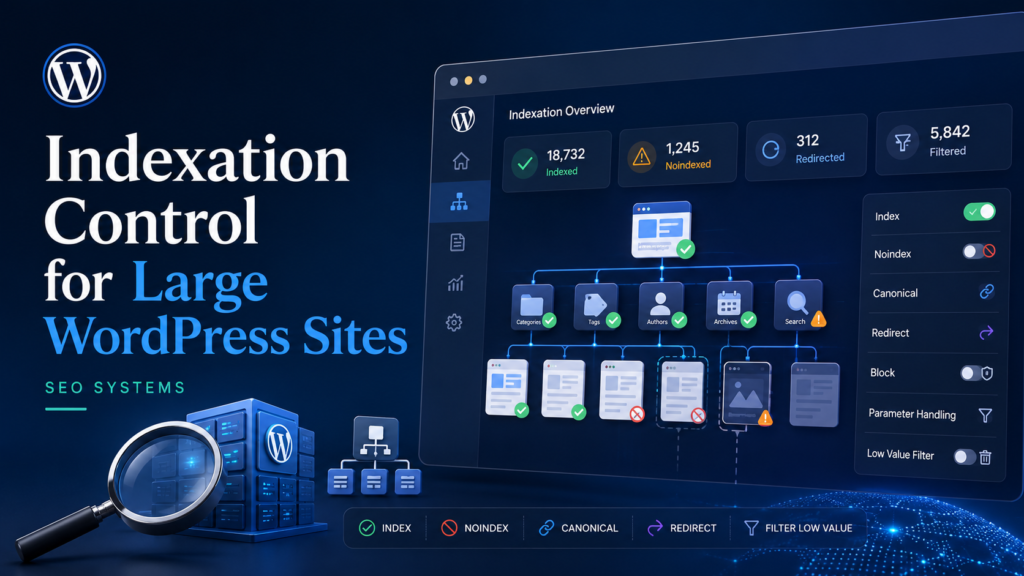
Before changing Rank Math or WordPress settings, inventory URL types: posts, pages, categories, tags, author archives, date archives, media attachment pages, pagination, internal search, feeds, custom post types, and any imported content templates. Each type needs an indexation decision.
The mistake is treating indexation as a page-by-page problem when it is often a template problem. One wrong global setting can create thousands of indexable low-value URLs.
Indexable does not mean valuable
A URL should be indexable because it satisfies a user need and belongs in search, not because WordPress can generate it. Curated category hubs may be useful. Empty tag archives usually are not. Author archives may be useful on an editorial site with real author authority, but weak on sites where authors are only admin accounts.
Indexation policy should include quality thresholds. For example, a category hub may need an intro, internal links, unique purpose, and enough supporting posts before it remains indexable.
Sitemap alignment
Only canonical indexable URLs should be in sitemaps. If a URL is noindexed, redirected, non-canonical, or low-value, keeping it in the sitemap creates mixed signals and makes QA harder.
WordPress URL type policy
| URL type | Default decision | Condition to index |
|---|---|---|
| Posts | Index | Helpful, canonical, not duplicate |
| Category hubs | Index selectively | Curated intro and useful links |
| Tag archives | Noindex by default | Only if curated and valuable |
| Author archives | Depends | Real author profile and unique value |
| Date archives | Noindex | Rarely useful for evergreen sites |
| Attachment pages | Redirect/noindex | No standalone value |
Indexation audit signals
| Signal | Meaning | Action |
|---|---|---|
| Crawled – currently not indexed | Quality or discovery issue | Review intent and links |
| Duplicate without user-selected canonical | Google chose another URL | Align canonical signals |
| Indexed low-value archive | Template leakage | Noindex or improve |
| Submitted URL marked noindex | Sitemap mismatch | Remove from sitemap or change robots |
| Soft 404 | Thin or mismatch page | Improve or remove |
Implementation workflow
- Inventory all URL types and templates.
- Assign index, noindex, canonicalize, redirect, or block decisions.
- Noindex thin or generic archives.
- Improve important category hubs before indexing them.
- Redirect or noindex attachment pages if they lack value.
- Keep sitemaps limited to canonical indexable URLs.
- Audit Search Console indexing by URL pattern.
- Repeat the audit after imports, theme changes, or plugin setting changes.
Common mistakes that make this system shallow
- Indexing every tag archive.
- Noindexing important category hubs accidentally.
- Leaving media attachment pages indexable.
- Putting noindexed URLs in sitemaps.
- Changing global SEO settings without checking templates.
- Assuming published means indexed.
Pre-production QA checklist
- [ ] All URL types are inventoried.
- [ ] Indexation policy is documented.
- [ ] Sitemap contains only intended URLs.
- [ ] Tag and author archives are reviewed.
- [ ] Attachment pages are controlled.
- [ ] Search Console patterns are monitored.
Monitoring signals after launch
Do not judge the system only by whether the first test worked. Use ongoing monitoring to detect drift, silent failure, and operational risk.
- indexed URL count by template
- noindex sitemap conflicts
- duplicate canonical reports
- soft 404 count
- category hub impressions
Incident review questions
- What exact input, event, URL, record, prompt, or action triggered the failure?
- Was the failure caused by source data, mapping, permissions, timing, platform behavior, or missing validation?
- Did the system fail safely, or did it create a downstream side effect?
- Was the issue visible in logs or only discovered by a user?
- What rule, test case, monitor, or approval step should be added so this failure is easier to catch next time?
Official documentation to check
Recommended operating standard
For WordPress indexation control, the minimum operating standard is: define the contract, test the failure modes, monitor the output, document the owner, and keep a rollback or review path. Anything less may work in a demo but will be fragile in production.
FAQ
Why is WordPress indexation control not just a one-time setup?
Because the surrounding systems change: APIs, tools, data, user behavior, plugins, prompts, feeds, and business rules. A one-time setup without monitoring becomes stale.
What is the first thing to test?
Test the failure mode that would create the most business damage: duplicate writes, wrong public pages, bad tracking, invalid feed data, unsafe AI action, or broken indexation.
Should this be automated completely?
Only low-risk, reversible steps should be fully automated. Anything that changes customer data, sends messages, publishes pages, affects payments, or modifies important SEO signals should have review, logging, or staged rollout.
How do I know the article's system is deep enough to publish?
It should include a real operating model: data fields or rules, failure modes, QA scenarios, monitoring signals, mistakes, and official documentation references.