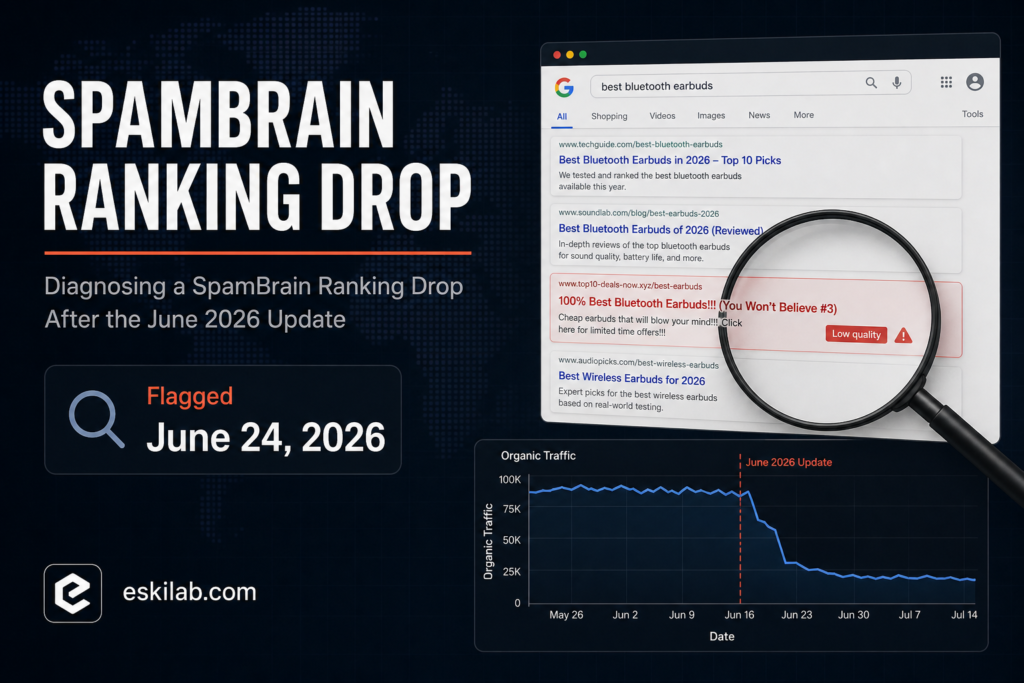
Google flagged a fast-moving spam ranking incident on June 24, 2026, targeting SpamBrain’s detection systems rather than the broader ranking signals a core update touches. It rolled out worldwide across all languages over several days and ran into July. If a site saw a sudden traffic drop in late June with no core update to point to, this is the first thing worth ruling in or out — and doing that correctly means telling it apart from a core update and from a manual action, which get diagnosed and fixed in different ways.
The Distinction That Determines Your Next Step
| Signal | Core Update | Spam Update (SpamBrain) | Manual Action |
|---|---|---|---|
| Search Console notification | None specific — inferred from timing and Google’s announcement | None specific — inferred from timing and Google’s announcement | Explicit message under Security & Manual Actions |
| What’s being reassessed | Broad relevance and quality signals across ranking systems | Spam detection classifiers specifically (scaled content abuse, site reputation abuse, expired domain abuse, and similar policy violations) | Specific pages or the whole site, reviewed by a human against a named policy violation |
| Fix path | Improve underlying content/quality; no submission process, recovery tracked at next update | Same — no reconsideration request process; recovery is algorithmic at a future reassessment | Fix the violation, then file a reconsideration request explicitly |
| Typical drop pattern | Gradual shift across many query types over the rollout window | Can be sharper and more concentrated on pages/sections matching a specific spam policy | Often sudden and tied to a specific set of pages or the entire site |
Diagnostic Checklist
- Check Search Console for a manual action first. This rules in or out the one case with an explicit process and a defined fix path — if there’s a manual action, stop investigating algorithmic causes and address the named violation directly.
- Overlay your traffic drop date against the confirmed spam update window (flagged June 24, 2026, rolling out over several days into July), not a core update timeline — these ran on different schedules this cycle and mixing them up sends you down the wrong remediation path.
- Segment the drop by page type or section, not just site-wide traffic. Spam updates targeting specific policy violations (scaled low-value content, expired-domain abuse, reputation abuse through hosted third-party content) tend to concentrate on the sections that match those patterns instead of hitting every page equally.
- Audit against the specific spam policies, not general quality guidelines — scaled content abuse (mass-produced pages adding no unique value), site reputation abuse (hosting low-quality third-party content to borrow domain authority), and expired domain abuse are the named categories SpamBrain-focused updates target.
- Fix what you find, but don’t file a reconsideration request — this update doesn’t have one, unlike a manual action. Remediation for an algorithmic spam update is reflected at a future reassessment, not through a submission process.
What Recovery Looks Like Here
There’s no dashboard confirmation that a specific page’s spam signal has cleared and no fixed timeline for reassessment — this is the least satisfying part of diagnosing an algorithmic spam update honestly. The realistic path is: identify content matching the named spam policies, remove or substantially rework it, stop producing more of it if it’s an ongoing pattern (like programmatic pages with no unique value), and monitor whether the affected sections recover at Google’s own pace rather than a date you can commit to. Promising a stakeholder a recovery date for an algorithmic update is a claim you can’t actually back up, and it’s worth saying that plainly instead of guessing a timeline to sound more confident.