Publishing without QA creates avoidable SEO problems: duplicate titles, missing meta descriptions, weak slugs, no internal links, wrong category, broken schema, or accidental noindex.
What This Solves
This checklist helps editors and SEO operators review a page before it goes live, especially on WordPress sites using Rank Math or similar SEO tools.
Who This Is For
- Developers and technical operators
- SEO, automation, or e-commerce teams
- Site owners who need a repeatable workflow
- Editors or builders documenting technical systems
Short Answer
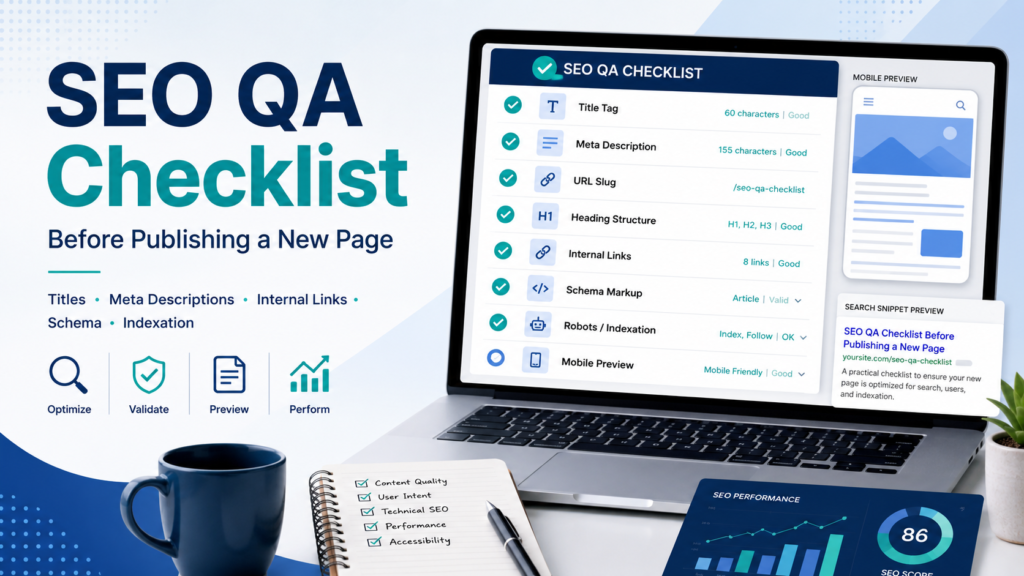
Check search intent, title, meta description, URL slug, heading structure, internal links, category, schema, indexation, and final content usefulness before publishing.
When This Happens
SEO QA matters when content production moves fast and small mistakes repeat across many pages.
Root Causes
| Symptom | Likely Cause | What to Check |
|---|---|---|
| Title too long | SERP truncation risk | SEO title clarity |
| No internal links | Weak discovery | Hub and related links |
| Wrong category | Messy structure | Primary category |
| No meta description | Poor snippet control | Rank Math field |
| Noindex set | Cannot rank | Robots settings |
Step-by-Step Fix or Implementation
- Confirm one clear search intent.
- Review H1 and SEO title.
- Write a unique meta description.
- Check slug length and clarity.
- Verify heading structure.
- Add internal links to hub and related guides.
- Check category and tags.
- Review schema settings.
- Check robots settings.
- Preview on mobile.
- Remove filler.
Practical Example
| Area | Check | Pass Standard |
|---|---|---|
| Title | Clear/searchable | Matches intent |
| Meta | Unique/useful | 140-160 characters |
| Slug | Short | No unnecessary dates |
| Links | Relevant | Hub plus related guides |
| Indexation | Correct | Index only useful pages |
Common Mistakes
- Duplicate meta descriptions.
- Vague slugs.
- Too many tags.
- No internal links.
- FAQ schema without real FAQs.
- Publishing AI drafts without review.
Risks and Limitations
- SEO QA cannot make weak content strong.
- Search engines may rewrite snippets.
- Different sites need different schema decisions.
Security and Validation Notes
- Do not expose API keys, tokens, or private customer data in screenshots, frontend code, public logs, or repositories.
- Use least-privilege access and human approval for destructive actions.
- Test with safe sample data before connecting production systems.
- Monitor failures after deployment instead of assuming the first successful test is enough.
Testing Checklist
- [ ] Search intent clear
- [ ] SEO title filled
- [ ] Meta description filled
- [ ] Slug clean
- [ ] Internal links added
- [ ] Category correct
- [ ] Robots correct
- [ ] Mobile preview checked
Recommended Setup
Create a pre-publish checklist in your editorial workflow and do not publish until the page passes title, meta, slug, internal link, and indexation checks.
Official Documentation to Check
Related Systems
- Rank Math Category SEO Setup
- Internal Linking System for WordPress Sites
- Programmatic SEO Without Thin Content
FAQ
Should every post have a meta description?
Yes, write one for clarity even if Google may rewrite the snippet.
Should every page be indexed?
No. Index only pages with enough unique value.
Is QA only for new posts?
No. Use it for updates too.
Official documentation to check
Platform behavior can change. Before relying on this guide for a production workflow, verify current details with the relevant official documentation or primary reference below.