Prompt Version Control System for Production AI Workflows
Last reviewed: 2026-05-10. This is a deep EskiLab implementation guide for prompt version control. It is written for teams that need operational reliability, not a surface-level definition.
Once a prompt controls a repeatable workflow, it becomes production logic. Production logic needs version control.
What this guide is designed to do
This guide helps teams stop production AI behavior from changing unpredictably when prompts, tools, models, or retrieval rules are edited. It focuses on the operating decisions behind the system: ownership, data contracts, failure modes, QA scenarios, monitoring, and the point where automation should stop and review should begin.
Who should use this
Ai operators, developers, support teams, agencies, marketers, and product teams maintaining reusable prompts should use this as a production planning and QA reference. It is especially relevant when the workflow affects customers, analytics, public pages, revenue, product data, or long-running automation.
Executive summary
A reliable prompt version control system defines the operating contract, validates inputs before action, tests failure modes, monitors drift after launch, and documents ownership so the workflow can be maintained without guesswork.
A prompt is more than text
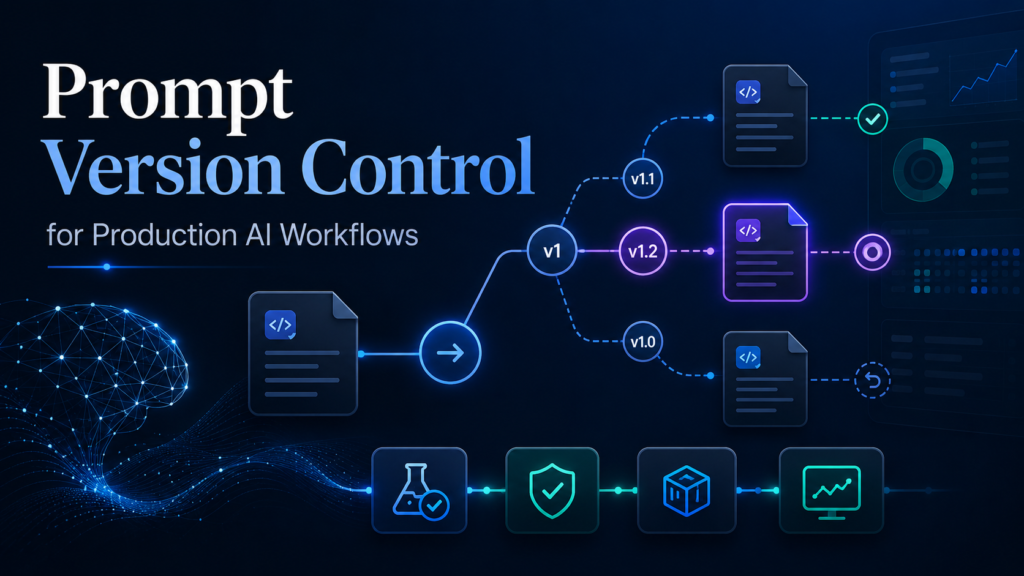
A production prompt includes the instruction text, variables, model, temperature or generation settings, tool access, retrieval rules, output schema, refusal rules, and examples. Versioning only the visible prompt text is not enough if the model or tool schema changes at the same time.
Treat each deployed prompt as a configuration bundle. A reviewer should be able to answer: what version is live, why was it changed, what tests were run, what workflows use it, and how do we roll back?
Evaluation before deployment
Every prompt change should run against a fixed test set. Include normal cases, edge cases, policy-sensitive cases, malformed inputs, and examples that previously failed. Compare outputs using review rubrics, not only personal preference.
Store evaluation scores with the prompt version. Even a simple pass/fail plus reviewer note is better than a mystery edit.
Rollback and staged release
Prompt rollback should be possible without rebuilding the workflow. If the prompt is embedded directly inside an automation step with no history, rollback becomes a manual hunt. Store versions outside the workflow or in a system where the previous version is easy to restore.
For high-impact AI systems, deploy prompt changes to a small workflow slice or internal-only path before full production.
Prompt version record
| Field | Purpose | Example |
|---|---|---|
| prompt_id | Stable prompt identity | support_reply_v3 |
| version | Change tracking | 3.2 |
| model_config | Behavior context | model, temperature, tools |
| test_score | Pre-deploy evidence | 27/30 pass |
| rollback_to | Recovery | 3.1 |
Change classification
| Change type | Risk | Required review |
|---|---|---|
| Typo fix | Low | Owner review |
| Output format change | Medium | Schema test |
| Tool permission change | High | Security review |
| Policy wording change | High | Domain review |
| Model change | High | Regression test |
Implementation workflow
- Assign every production prompt a stable ID and owner.
- Store prompt text, variables, model settings, tools, retrieval rules, and output schema.
- Create a fixed evaluation set with normal, edge, and failure cases.
- Record change reason before editing.
- Run evaluation before deployment.
- Deploy risky changes in stages.
- Keep rollback versions available.
- Review prompt performance after model, tool, or knowledge base updates.
Common mistakes that make this system shallow
- Editing prompts directly inside production automations.
- Saving only the latest prompt.
- Testing with one favorite example.
- Ignoring tool schema and model setting changes.
- No owner for prompt approval.
- Mixing experiments and production prompts.
Pre-production QA checklist
- [ ] Prompt ID and owner exist.
- [ ] Version history is stored.
- [ ] Test set exists.
- [ ] Evaluation results are recorded.
- [ ] Rollback version is available.
- [ ] Tool and retrieval changes are versioned too.
Monitoring signals after launch
Do not judge the system only by whether the first test worked. Use ongoing monitoring to detect drift, silent failure, and operational risk.
- prompt version incident count
- edit rate after deployment
- rejection rate
- rollback count
- evaluation pass rate
Incident review questions
- What exact input, event, URL, record, prompt, or action triggered the failure?
- Was the failure caused by source data, mapping, permissions, timing, platform behavior, or missing validation?
- Did the system fail safely, or did it create a downstream side effect?
- Was the issue visible in logs or only discovered by a user?
- What rule, test case, monitor, or approval step should be added so this failure is easier to catch next time?
Official documentation to check
Recommended operating standard
For prompt version control, the minimum operating standard is: define the contract, test the failure modes, monitor the output, document the owner, and keep a rollback or review path. Anything less may work in a demo but will be fragile in production.
FAQ
Why is prompt version control not just a one-time setup?
Because the surrounding systems change: APIs, tools, data, user behavior, plugins, prompts, feeds, and business rules. A one-time setup without monitoring becomes stale.
What is the first thing to test?
Test the failure mode that would create the most business damage: duplicate writes, wrong public pages, bad tracking, invalid feed data, unsafe AI action, or broken indexation.
Should this be automated completely?
Only low-risk, reversible steps should be fully automated. Anything that changes customer data, sends messages, publishes pages, affects payments, or modifies important SEO signals should have review, logging, or staged rollout.
How do I know the article's system is deep enough to publish?
It should include a real operating model: data fields or rules, failure modes, QA scenarios, monitoring signals, mistakes, and official documentation references.